Basically there are two kinds of SAN switches in the market.
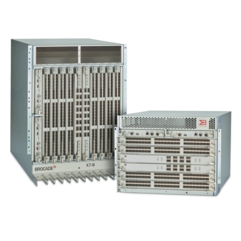
Since Brocade was bought by Broadcom, sometimes they are also referred as Broadcom Switches 博通交换机. In IBM, they are referred as b-type switches and c-type swtiches respectively. Today I am going to talk more about b-type switches. There are two types of brocade swtiches:- standard switches(交换机), also known as pizzabox
- director(导向器)

In general there are two types of data collection for broadcade switches: supportshow and supportsave
- supportshow: connect to the switch via ssh and run command
supportshow
and save the output to a file. It is useful for diagnosing some well defined issues, like a specific port error, a specific sfp problem etc - supportsave is always recommended for diagnosing genral switch issues or you have a IO problem in the
SAN environment and you want the switch team to check from SAN wise.
This is supportsave
collection procedure
- prepar a FTP server
- run supportsave and specify the FTP server information so that the collected data will be offloaded to the FTP server
- package a number of files to a single one
Let's take a close look at the supportsave package. It is usually packged as a single file like tgz or .zip or RAR file. after you uncompress the file, you get a list of compressed files like the following:
#cd /tmp/switch
#ls
IBM_2498_B40-S0cp-201410101405.AGDUMP.txt.ss.gz
IBM_2498_B40-S0cp-201410101405.AGWWNS.ss.gz
.
.
.
IBM_2498_B40-S0cp-201410101409.VFABRIC.txt.ss.gz
IBM_2498_B40-S0cp-201410101409.archived_log.tgz.ss.gz
You need to use a tool supportDecode.pl to uncompress the gz files as well as decode a few bindary files.
$ supportDecode.pl
No argument found, using local directory...
Begin Extracting files...
Extract Complete!

Begin Untaring files...
Untaring the B40_41-S0cp-202103020921.BLSREGDUMP.tar
var/blsemptyregdump.txt
Untaring the B40_41-S0cp-202103020921.C1REGDUMP.tar
var/c1emptyregdump.txt
Untaring the B40_41-S0cp-202103020921.C2REGDUMP.tar
/var/c2regdump.dmp.0.0.gz
/var/c2hregdecode
/var/c2hregcmp
Untaring the B40_41-S0cp-202103020921.PBREGDUMP.tar
var/pbemptyregdump.txt
Untaring the B40_41-S0cp-202103020922.AVREGDUMP.tar
var/avemptyregdump.txt
Untaring the B40_41-S0cp-202103020922.C3REGDUMP.tar
var/c3emptyregdump.txt
Untaring the B40_41-S0cp-202103020923.DM_FTR_FFDC.tar
/var/log/Dmesg_ffdc.tar
Untaring the B40_41-S0cp-202103020923.MP_LOG.tar
var/log/mp_trace
var/log/mp_snap
Untar Complete!

Begin decoding files...

Decode Complete!
......
After that, you will get a number of text files as follows:
$ ls
B40_41_FID128-S0cp-202103020923.AMS_MAPS_LOG.txt     B40_41-S0cp-202103020917.SSHOW_ISWITCH.txt  B40_41-S0cp-202103020921.CEEDEBUG.txt        B40_41-S0cp-202103020922.esmd.tar.txt
B40_41_FID128-S0cp-202103020923.FLOW_VISION_LOG.txt  B40_41-S0cp-202103020917.VPWWN_CFG.txt      B40_41-S0cp-202103020921.CEETECHSUPPORT.txt  B40_41-S0cp-202103020922.FCIP.txt
B40_41-S0cp-202103020916.CTRACE_OLD.dmp              B40_41-S0cp-202103020918.SSHOW_EX.txt       B40_41-S0cp-202103020921.FCOESUPPORT.txt     B40_41-S0cp-202103020922.MAPS.txt
B40_41-S0cp-202103020916.CTRACE_OLD_MNT.dmp          B40_41-S0cp-202103020918.SSHOW_FABRIC.txt   B40_41-S0cp-202103020921.PBREGDUMP.tar       B40_41-S0cp-202103020922.VFABRIC.txt
B40_41-S0cp-202103020916.FTRACE_START.dmp            B40_41-S0cp-202103020918.SSHOW_OS.txt       B40_41-S0cp-202103020921.SSHOW_AG.txt        B40_41-S0cp-202103020923.AN_DEBUG.txt
B40_41-S0cp-202103020916.RAS.txt                     B40_41-S0cp-202103020918.SSHOW_PLOG.txt     B40_41-S0cp-202103020921.SSHOW_CRYP.txt      B40_41-S0cp-202103020923.DM_FTR_FFDC.tar
B40_41-S0cp-202103020917.AGDUMP.txt                  B40_41-S0cp-202103020919.SSHOW_NET.txt      B40_41-S0cp-202103020921.SSHOW_DCEHSL.txt    B40_41-S0cp-202103020923.MP_LOG.tar
B40_41-S0cp-202103020917.AGWWN_CFG.txt               B40_41-S0cp-202103020919.SSHOW_SEC.txt      B40_41-S0cp-202103020921.SSHOW_FCIP.txt      B40_41-S0cp-202103020924.RAS_POST.txt
B40_41-S0cp-202103020917.AGWWNS.txt                  B40_41-S0cp-202103020919.SSHOW_SERVICE.txt  B40_41-S0cp-202103020921.SSHOW_FLOW.txt      slot0cp/
B40_41-S0cp-202103020917.CTRACE_NEW.dmp              B40_41-S0cp-202103020920.SSHOW_ASICDB.txt   B40_41-S0cp-202103020921.SSHOW_PORT.txt      SLOT0cp-B40_41-202103020916-SUPPORTSHOW_ALL.txt
B40_41-S0cp-202103020917.DIAG.txt                    B40_41-S0cp-202103020920.SSHOW_FICON.txt    B40_41-S0cp-202103020922.AVREGDUMP.tar       wwpn
B40_41-S0cp-202103020917.FABRIC.txt                  B40_41-S0cp-202103020920.SSHOW_SYS.txt      B40_41-S0cp-202103020922.BCM_STATS.txt       xxx
B40_41-S0cp-202103020917.IF_TREE.txt                 B40_41-S0cp-202103020921.BLSREGDUMP.tar     B40_41-S0cp-202103020922.C3REGDUMP.tar
B40_41-S0cp-202103020917.ISCSID_DBG.txt              B40_41-S0cp-202103020921.C1REGDUMP.tar      B40_41-S0cp-202103020922.CRYP.txt
B40_41-S0cp-202103020917.RTE.txt                     B40_41-S0cp-202103020921.C2REGDUMP.tar      B40_41-S0cp-202103020922.ENC_LOGGER.tgz.txt
For FRU like power supplies, FAN, port blade, core blade or CP blade, check the chassisshow command output. It is included in the SSHOW_SYS.txt file. If it is a director class switch, check the SSHOW_SYS from the active CP.
A tip: To determine which CP is the active CP, I usually check the SSHOW_SYS output with larger size. Here is an example:
ls -l |grep SSHOW_SYS
-rwxr-xr-x 1 root root    839685 Aug  2  2022 X6-4-9.x.x.x-S1cp-202208021022.SSHOW_SYS.txt  <==== S1cp should be the active CP.
-rwxr-xr-x 1 root root    532205 Aug  2  2022 X6-4-9.x.x.x-S2cp-202208021024.SSHOW_SYS.txt
If it is a pizza box class switch, simply check the SSHOW_SYS output. As you may notice the file is very large, over 800KB thus inconvenient for us as a support engineer to check the content in the file. So I wrote a script to split the large file to a number of small files. Each file contains a single command output.
switchdata/.lab1.x6_director_v9.tmp_zl.activecp/sshow_sys$ pwd
switchdata/.lab1.x6_director_v9.tmp_zl.activecp/sshow_sys
switchdata/.lab1.x6_director_v9.tmp_zl.activecp/sshow_sys$ ll
total 921
.....
-rwxr-xr-x 1 root root 344424 May 11  2023 cat__var_log_configshowall*
-rwxr-xr-x 1 root root    758 May 11  2023 cat__var_log_fabos.chassis.conf*
-rwxr-xr-x 1 root root   5160 May 11  2023 chassisshow*                        <=====
-rwxr-xr-x 1 root root   2161 May 11  2023 chkconfig*
-rwxr-xr-x 1 root root 123881 May 11  2023 clihistory_--showall*
-rwxr-xr-x 1 root root    460 May 11  2023 creditrecovmode_--show*
-rwxr-xr-x 1 root root  10580 May 11  2023 dbgshow*
-rwxr-xr-x 1 root root    941 May 11  2023 emhsmtraceshow*
-rwxr-xr-x 1 root root   3950 May 11  2023 emtraceshow*
-rwxr-xr-x 1 root root   8415 May 11  2023 emtraceshow2*
-rwxr-xr-x 1 root root    267 May 11  2023 fanshow*
......*
So to check the PN, check the chassisshow output as follows:
- Power Supply
POWER SUPPLY  Unit: 1
Power Source:           AC
PS Voltage input:       201.00 V
Fan Direction:          Non-portside Intake
Header Version:         2
Power Consume Factor:   2870W
Factory Part Num:       23-0000161-01
Factory Serial Num:     DUC2M51XXXX
Manufacture:            Day: 21  Month: 12  Year: 2015
Update:                 Day:  2  Month:  8  Year: 2022
Time Alive:             2066 days
Time Awake:             20 days
- Fan
FAN  Unit: 1
Fan Direction:          Non-portside Intake
Header Version:         2
Power Consume Factor:   -300W
Factory Part Num:       60-1003203-04
Factory Serial Num:     DYL3009XXXX
Manufacture:            Day:  4  Month:  5  Year: 16
Update:                 Day:  2  Month:  8  Year: 2022
Time Alive:             2065 days
Time Awake:             111 days
ID:                     BROCADE
- port blade:
SW BLADE  Slot: 3
Header Version:         2
Power Consume Factor:   -245W
Power Usage:            -159W
Factory Part Num:       60-1003200-09
Factory Serial Num:     DYJ3208XXXX
Manufacture:            Day: 27  Month:  2  Year: 2016
Update:                 Day:  2  Month:  8  Year: 2022
Time Alive:             2066 days
Time Awake:             111 days
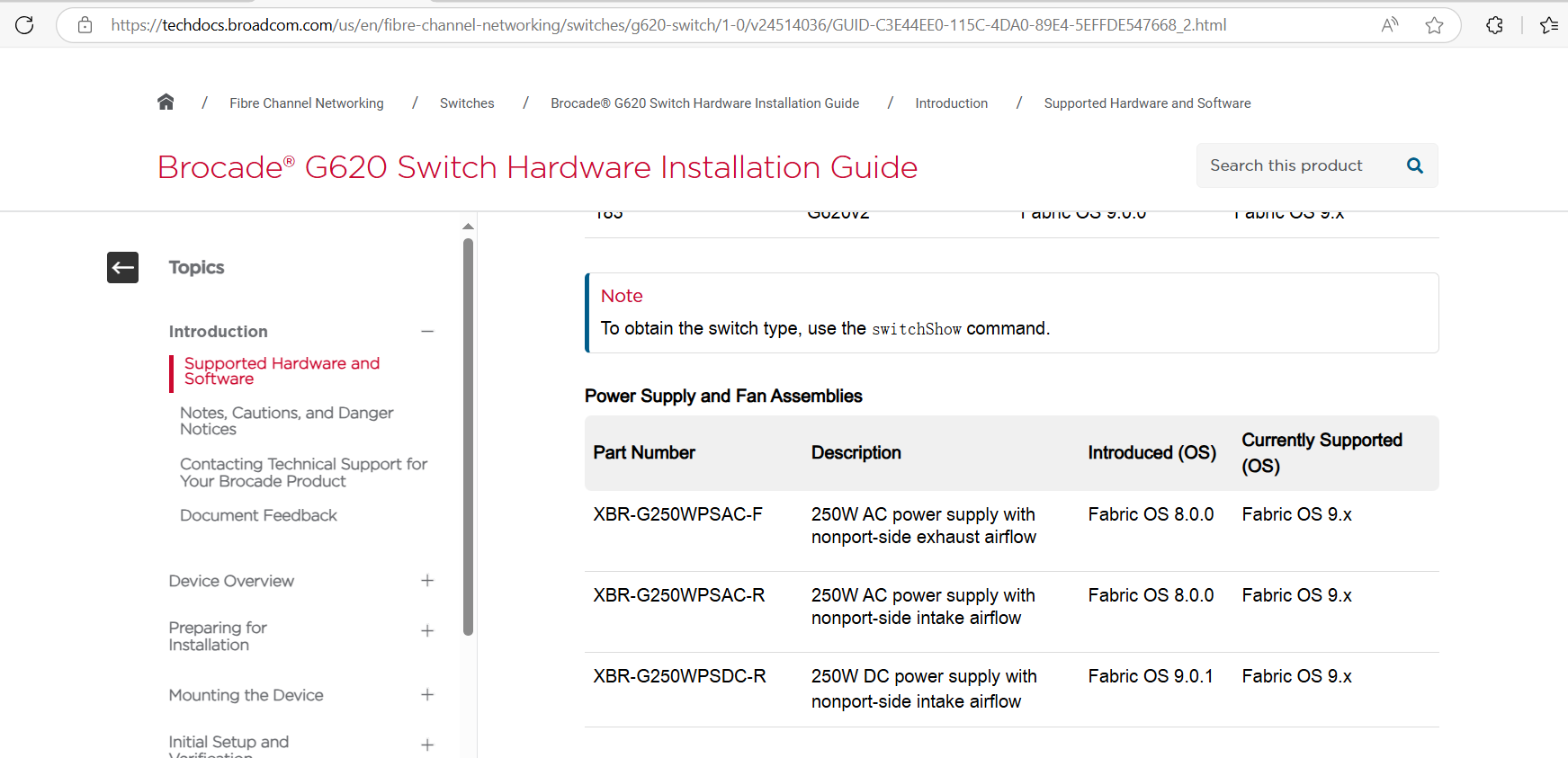
For SFP part information, check sfpshow output, vendor PN field. It is also in the SSHOW_SYS file
Slot  3/Port  0:
=============
Identifier:  3    SFP
Connector:   7    LC
Transceiver: 6804404000000000 8,16,32_Gbps M5 sw Short_dist
Encoding:    6    64B66B
Baud Rate:   280  (units 100 megabaud)
Length 9u:   0    (units km)
Length 9u:   0    (units 100 meters)
Length 50u (OM2):  3    (units 10 meters)
Length 50u (OM3):  7    (units 10 meters)
Length 62.5u:0    (units 10 meters)
Length 50u (OM4):  10   (units 10 meters)
Vendor Name: BROCADE
Vendor OUI:  00:05:1e
Vendor PN:   57-1000333-01
Vendor Rev:  A
Wavelength:  850  (units nm)
Options:     083a Loss_of_Sig,Tx_Fault,Tx_Disable
BR Max:      112
BR Min:      0
Serial No:   JAA3154XXXXXXXX
Date Code:   151203
DD Type:     0x68
Enh Options: 0xfa
Status/Ctrl: 0x0
Pwr On Time: 5.27 years (46210 hours)
E-Wrap Control: 0
O-Wrap Control: 0
Alarm flags[0,1] = 0x5, 0x0
Warn Flags[0,1] = 0x5, 0x0
Temperature: 39      Centigrade
Current:     7.912   mAmps
Voltage:     3305.6  mVolts
RX Power:    -2.4    dBm (580.2uW)
TX Power:    -1.1    dBm (772.1 uW)
part replacement procedure can be found in hardware installation guide in each switch product document. https://techdocs.broadcom.com/us/en/fibre-channel-networking.html
Usually the power supply and fan assembly units are hot-swappable if they are replaced one at a time. Other parts replacement procedure, like CP blade, core blade, port blade, can also be found in the hardware installation guide.
What type of the switch it is when we have a switch supportsave and its serial number? For switch type, check switchshow output. Here is an exmaple:
./sshow_sys$ cat switchshow.128
CURRENT CONTEXT -- 0, 128
/fabos/bin/switchshow :
switchName:     X6-4
switchType:     165.0    <===
switchState:    Online
switchMode:     Native
switchRole:     Principal
switchDomain:   16
switchId:       fffc10
switchWwn:      10:00:c4:f5:7c:XX:XX:XX
zoning:         ON (FabricVision2)
switchBeacon:   OFF
FC Router:      OFF
Fabric Name:    32Gb SAN fabric
HIF Mode:       OFF
Allow XISL Use: OFF
LS Attributes:  [FID: 128, Base Switch: No, Default Switch: Yes, Ficon Switch: No, Address Mode 1]
Index Slot Port Address Media  Speed        State    Proto
============================================================
0    3    0   100000   id    N32       Online      FC  E-Port  segmented,10:00:88:94:71:XX:XX:XX (Long distance mode incompat)
1    3    1   100100   id    N32       Online      FC  E-Port  10:00:c4:f5:7c:XX:XX:XX "sc8961a" (downstream)(Trunk master)
2    3    2   100800   id    N8        Online      FC  F-Port  21:00:00:1b:32:XX:XX:XX
3    3    3   100900   id    N8        Online      FC  F-Port  21:01:00:1b:32:XX:XX:XX
......
In this example, the switch type is 165.0. Each type of brocade switch has a unique number to identify its model and generation. Here is the document. Brocade switch type The following is a more complete list of information from the switchtype to brocade product name and IBM switch model, product name.
when (62) {$BROCADE_PRODUCT_NAME="Gen 4: Brocade DCX Backbone" ; &warningPrint ("EOS Hardware") ; &infoPrint ("switch product name is $BROCADE_PRODUCT_NAME") ;break;} when (64) {$BROCADE_PRODUCT_NAME="Gen 4: Brocade 5300, IBM 2498 Model B80" ; &warningPrint ("EOS Hardware") ; &infoPrint ("switch product name is $BROCADE_PRODUCT_NAME") ;break;} when (66) {$BROCADE_PRODUCT_NAME="Gen 4: Brocade 5100 IBM 2498-B40/40E" ; &warningPrint ("EOS Hardware") ; &infoPrint ("switch product name is $BROCADE_PRODUCT_NAME") ;break;} when (71) {$BROCADE_PRODUCT_NAME="Gen 4: Brocade 300, IBM 2498-B24 2498-24E" ; &infoPrint ("switch product name is $BROCADE_PRODUCT_NAME;End-of-Support: 04/16/2024; updated July 31, 2023https://www.ibm.com/docs/en/announcements/revised-eos-date-cisco-brocade-hardware?region=EMEA ") ;break;} when (77) {$BROCADE_PRODUCT_NAME="Gen 4: Brocade DCX-4S" ; &warningPrint ("EOS Hardware") ; &infoPrint ("switch product name is $BROCADE_PRODUCT_NAME; End-of-Support: October 31, 2024") ;break;} when (83) {$BROCADE_PRODUCT_NAME="Gen 4: Brocade 7800 Extension Switch, IBM 2498-R06" ; &infoPrint ("switch product name is $BROCADE_PRODUCT_NAME") ;break; } when (109) {$BROCADE_PRODUCT_NAME="Gen 5: Brocade 6510 Switch, IBM 2498-F48, 48-Port Switch" ; &infoPrint ("switch product name is $BROCADE_PRODUCT_NAME") ;break;} when (117) {$BROCADE_PRODUCT_NAME="Brocade 6547 Embedded Switch, 16 Gb 48-port Blade Server SAN I/O Module" ; &infoPrint ("switch product name is $BROCADE_PRODUCT_NAME") ;break; } when (118) {$BROCADE_PRODUCT_NAME="Gen 5: Brocade 6505 Switch 2498 Model F24 or X24, 249824G;IBM System Networking SAN24B-5" ; &infoPrint ("switch product name is $BROCADE_PRODUCT_NAME") ;break;} when (120) {$BROCADE_PRODUCT_NAME="Gen 5: Brocade DCX 8510-8 Backbone, IBM 2499-816" ; &infoPrint ("switch product name is $BROCADE_PRODUCT_NAME") ;break;} when (121) {$BROCADE_PRODUCT_NAME="Gen 5: Brocade DCX 8510-4 Backbone, IBM 2499-416" ; &infoPrint ("switch product name is $BROCADE_PRODUCT_NAME") ;break;} when (133) {$BROCADE_PRODUCT_NAME="Gen 5: Brocade 6520, IBM 2498 Models F96 and N96" ; &infoPrint ("switch product name is $BROCADE_PRODUCT_NAME") ;break;} when (148) {$BROCADE_PRODUCT_NAME="Gen 5: FCIP Brocade 7840 extension switch, IBM 2498-R42" ; &infoPrint ("switch product name is $BROCADE_PRODUCT_NAME") ;break;} when (162) {$BROCADE_PRODUCT_NAME="Gen 6: Brocade G620, IBM 8960-F64, 8960-N64" ; &infoPrint ("switch product name is $BROCADE_PRODUCT_NAME") ;break;} when (165) {$BROCADE_PRODUCT_NAME="Gen 6: Brocade X6-4 Director, IBM 8961-F04" ; &infoPrint ("switch product name is $BROCADE_PRODUCT_NAME") ;break;} when (166) {$BROCADE_PRODUCT_NAME="Gen 6: Brocade X6-8 Director, IBM 8961-F08" ; &infoPrint ("switch product name is $BROCADE_PRODUCT_NAME") ;break;} when (170) {$BROCADE_PRODUCT_NAME="Gen 6: Brocade G610 32 Gb 24-port switch, IBM 8960-F24; NOTE: 170.5 is 8969 F24" ; &infoPrint ("switch product name is $BROCADE_PRODUCT_NAME") ;break;} when (173) {$BROCADE_PRODUCT_NAME="Gen 6: Brocade G630, IBM 8960-F96 and 8960-N96" ; &infoPrint ("switch product name is $BROCADE_PRODUCT_NAME") ;break;} when (178) {$BROCADE_PRODUCT_NAME="Gen 6: Brocade 7810 Extension Switch, IBM 8960-R18" ; &infoPrint ("switch product name is $BROCADE_PRODUCT_NAME") ;break;} when (179) {$BROCADE_PRODUCT_NAME="Gen 7: Brocade X7-4 Director, IBM 8961-F74" ; &infoPrint ("switch product name is $BROCADE_PRODUCT_NAME") ;break;} when (180) {$BROCADE_PRODUCT_NAME="Gen 7: Brocade X7-8 Director, IBM 8961-F78" ; &infoPrint ("switch product name is $BROCADE_PRODUCT_NAME") ;break;} when (181) {$BROCADE_PRODUCT_NAME="Gen 7: Brocade G720 Switch, IBM 8960-P64 and 8960-R64" ; &infoPrint ("switch product name is $BROCADE_PRODUCT_NAME") ;break;} when (183) {$BROCADE_PRODUCT_NAME="Gen 6: Brocade G620 Fixed-port switch with configurable scaling from 24 to 64 ports. IBM 8960-N65" ; &infoPrint ("switch product name is $BROCADE_PRODUCT_NAME") ;break;} when (184) {$BROCADE_PRODUCT_NAME="Gen 6: Brocade G630 Switch, IBM 8960 F97 N97" ; &infoPrint ("switch product name is $BROCADE_PRODUCT_NAME") ;break;} when (189) {$BROCADE_PRODUCT_NAME="Gen 7: Brocade G730 Switch, Fixed-port switch with configurable scaling from 48 ports to 128 ports. It supports 64G, 32G, 16G, and 10G media types. IBM 8969 Models P96/R96" ; &infoPrint ("switch product name is $BROCADE_PRODUCT_NAME") ;break;} when (190) {$BROCADE_PRODUCT_NAME="Gen 7: Brocade 7850 Extension Switch, IBM 8969 R42" ; &infoPrint ("switch product name is $BROCADE_PRODUCT_NAME") ;break} The next important thing is to determine if the switch is the one the client use to open the ticket, ie. it is under a valid support contract.
WWN  Unit: 1
System AirFlow:         Non-portside Intake
Header Version:         2
Power Consume Factor:   -1W
Factory Part Num:       60-1004116-02
Factory Serial Num:     FNQ30XXXXXX
Manufacture:            Day:  8  Month:  6  Year: 21
Update:                 Day:  0  Month:  0  Year: 0
Time Alive:             696 days
Time Awake:             669 days
ID:                     ABC0000CA
Part Num:               0089610000F78
Serial Num:             75XXXXX
Generation Num:         7
Factory Serial Num is the brocade switch SN and Serial Num is IBM switch S/N. So if we are dealing with switches not from IBM OEM, we may not be able to find the Serial Num in this section
The switcshow output contains brief information about switch domain ID, port addresses and whether or not NPIV is used in some ports. The following example shows the switch domain ID is 122 (in decimal). Note that each port address starts with 7a (in hex), which is 122 in decimal. Let's take a close look at one particular port address 7a0400. It can be interpreted as
- domain ID is 0x7a
- probably the port is in slot 4 (not always true).
- it is not a NPIV address.
switchName:     LSAT_D2_F4_PUBLIC_IT
switchType:     180.0
switchState:    Online
switchMode:     Native
switchRole:     Subordinate
switchDomain:   122
switchId:       fffc7a
switchWwn:      10:00:d8:1f:cc:XX:XX:XX
zoning:         ON (ZS_F4_41_ACTIVE)
switchBeacon:   OFF
FC Router:      OFF
Fabric Name:    IT-F4-PUBLIC-IT
HIF Mode:       OFF
Allow XISL Use: ON
LS Attributes:  [FID: 41, Base Switch: No, Default Switch: No, Ficon Switch: No, Address Mode 0]
Index Slot Port Address Media  Speed        State    Proto
============================================================
4    3    4   7a0400   id    N16       Online      FC  F-Port  50:05:07:68:0c:52:bb:XX
5    3    5   7a0500   id    N16       Online      FC  F-Port  50:05:07:68:0b:32:cd:XX
6    3    6   7a0600   id    N16       Online      FC  F-Port  1 N Port + 2 NPIV public  <=====
7    3    7   7a0700   id    N16       Online      FC  F-Port  1 N Port + 2 NPIV public
8    3    8   7a0800   id    N32       Online      FC  F-Port  50:00:09:74:10:10:38:XX
Then we check portloginshow output and we know the NPIV in details as follows. 7a0600, 7a0601 and 7a0602 share the same physical port.
portloginshow 6
Type  PID     World Wide Name        credit df_sz cos
=====================================================
fd  7a0602 50:05:07:68:0c:5a:ce:XX    40  2048   8  scr=0x3
fd  7a0601 50:05:07:68:0c:56:ce:XX    40  2048   8  scr=0x3
fe  7a0600 50:05:07:68:0c:52:ce:XX    40  2048   8  scr=0x3
ff  7a0600  50:05:07:68:0c:52:ce:XX     0     0   8  d_id=FFFC7A
- 50:05:07:68 is spec-v family storage, like SVC, V7000, FS9100 etc
- 50:05:07:63:0 is more likely DS8000 family
- 50:01:73:80 is XIV storage
- 50:05:07:60 is FS900 storage
Let's consider this scenario. A client raised an issue regarding a WWPN like 50:05:07:68:0c:56:ce:bc. He want SAN switch support to check this port to see if there is any issues regarding this port. This is a very common request and we need to have a quick solution in response to this request.
- if the WWPN is indeed login to this switch.
- what is the alias, the zone information
- the port statistics
- SFP information.
========= WWPN check=========
50:05:07:68:0c:5a:ce:XX
fcAddress is 7a0602
Port Index is 6

portloginshow 6
Type  PID     World Wide Name        credit df_sz cos
=====================================================
fd  7a0602 50:05:07:68:0c:5a:ce:XX    40  2048   8  scr=0x3
fd  7a0601 50:05:07:68:0c:56:ce:XX    40  2048   8  scr=0x3
fe  7a0600 50:05:07:68:0c:52:ce:XX    40  2048   8  scr=0x3
ff  7a0600  50:05:07:68:0c:52:ce:XX     0     0   8  d_id=FFFC7A

50:05:07:68:0b:32:cd:XX
fcAddress is 7a0500
Port Index is 5

portloginshow 5
Type  PID     World Wide Name        credit df_sz cos
=====================================================
fe  7a0500 50:05:07:68:0b:32:cd:XX    40  2048   8  scr=0x3
ff  7a0500  50:05:07:68:0b:32:cd:XX     0     0   8  d_id=FFFC7A

50:05:07:68:0c:52:bb:XX
fcAddress is 7a0400
Port Index is 4

portloginshow 4
Type  PID     World Wide Name        credit df_sz cos
=====================================================
fe  7a0400 50:05:07:68:0c:52:bb:XX    40  2048   8  scr=0x3
ff  7a0400  50:05:07:68:0c:52:bb:XX     0     0   8  d_id=FFFC7A

Index Slot Port Address Media  Speed        State    Proto
============================================================
6    3    6   7a0600   id    N16       Online      FC  F-Port  1 N Port + 2 NPIV public
5    3    5   7a0500   id    N16       Online      FC  F-Port  50:05:07:68:0b:32:cd:XX
4    3    4   7a0400   id    N16       Online      FC  F-Port  50:05:07:68:0c:52:bb:XX

        frames        enc     crc     crc     too     too     bad     enc    disc    link    loss    loss    frjt    fbsy     c3timeout     pcs      uncor
     tx       rx      in     err     g_eof   shrt    long    eof     out    c3      fail    sync    sig                      tx      rx      err     err
6:  420.7g    1.7t    0       0       0       0       0       0       0     235       0       0       2       0       0       0      95       0       0
5:   20.8g   27.1g    0       0       0       0       0       0       0       1.4k    0       0       3       0       0       0       0       0       0
4:  668.2g  137.8g    0       0       0       0       0       0       0       0       0       0       0       0       0       0       0       0       0
Slot 3, Port 6
RX Power:    -3.1    dBm (493.5uW)
TX Power:    -2.3    dBm (585.9 uW)
Slot 3, Port 5
RX Power:    -3.1    dBm (490.0uW)
TX Power:    -2.1    dBm (620.7 uW)
Slot 3, Port 4
RX Power:    -2.1    dBm (615.5uW)
TX Power:    -1.2    dBm (752.0 uW)

50:05:07:68:0c:5a:ce:XX has the alias of SVCNAT-ZTV0_N14
50:05:07:68:0b:32:cd:XX has the alias of V70KAT-51NR_IO0-C1-P6
50:05:07:68:0c:52:bb:XX has the alias of SVCNAT-FVG0_P14

50:05:07:68:0b:32:cd:XX is in the zone: ZBE_SVCCMV-0034_V70KAT-51NR
50:05:07:68:0b:32:cd:XX is in the zone: ZBE_SVCCMV-0036_V70KAT-51NR
50:05:07:68:0b:32:cd:XX is in the zone: ZBE_SVCCMV-0035_V70KAT-51NR
50:05:07:68:0b:32:cd:XX is in the zone: ZBE_SVCCMV-0037_V70KAT-51NR
50:05:07:68:0b:32:cd:XX is in the zone: ZCL_V70KAT-51NR

50:05:07:68:0c:52:bb:XX is in the zone: ZBE_SVCCMV05_FS90AT-130Y
Based on the above output, we can have some conclusion:
- they are likely SVC, V7000 storage ports
- SFP looks good for all 3 ports
- port 6 has a few c3timeout on rx and may need to pay more attention on this
Next I will talk more about the c3timeout on tx and rx, ie: slow drain 101. First remember the flow control is based on buffer-to-buffer(BB) credit. in short, a port need to have BB credit before it can send frame. when a port receives a R_RDY frame, it means it get a BB credit. A R_RDY frame can lost during trasmit or for unkown reason, a misbehavior port does not send R_RDY in time.
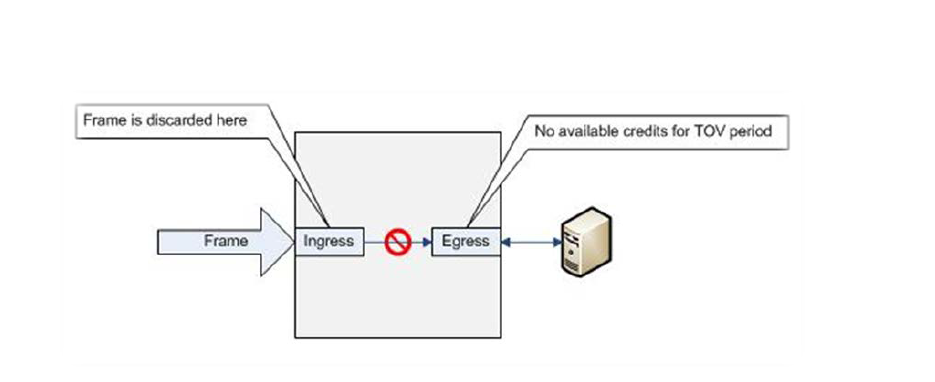
The above picture is c3timeout on rx
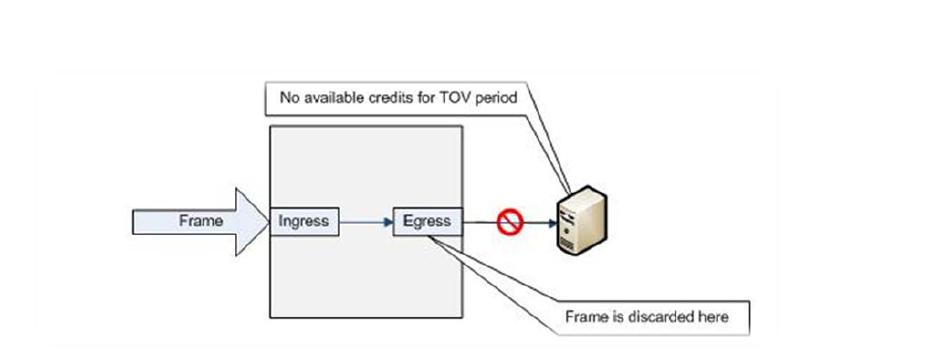
The above picture is c3timeout on tx. Our job is to find the port with tx timeout.
- Example 1, it is a perfect example to show c3timeout on tx and rx. So the device attached to port 5
has some problem and should be investigated.
CURRENT CONTEXT -- 0 , 128 frames enc crc crc too too bad enc disc link loss loss frjt fbsy c3timeout pcs tx rx in err g_eof shrt long eof out c3 fail sync sig tx rx err 0: 2.3g 658.8m 0 0 0 0 0 0 0 2 0 0 0 0 0 0 0 0 1: 73.9m 226.4m 0 0 0 0 0 0 513 36 1 1 1 0 0 0 36 0 2: 0 0 0 0 0 0 0 0 0 0 0 0 0 0 0 0 0 0 3: 0 0 0 0 0 0 0 0 0 0 0 0 0 0 0 0 0 0 4: 658.8m 2.3g 0 0 0 0 0 0 0 0 1 0 1 0 0 0 0 0 5: 226.4m 73.8m 0 0 0 0 0 0 0 36 4 0 3 0 0 36 0 0 - Example 2, there is only rx timeout. If there is no tx timeout on F-ports, we need to check if there
is ISL link with this switch and check if there is any congestion on the ISL link.
CURRENT CONTEXT -- 2, 41
/fabos/cliexec/porterrshow :
         frames        enc     crc     crc     too     too     bad     enc    disc    link    loss    loss    frjt    fbsy     c3timeout     pcs      uncor
      tx       rx      in     err     g_eof   shrt    long    eof     out    c3      fail    sync    sig                      tx      rx      err     err
4:  668.2g  137.8g    0       0       0       0       0       0       0       0       0       0       0       0       0       0       0       0       0
5:   20.8g   27.1g    0       0       0       0       0       0       0       1.4k    0       0       3       0       0       0       0       0       0
6:  420.7g    1.7t    0       0       0       0       0       0       0     235       0       0       2       0       0       0      95       0       0
......
What_is_the_information_given_from_a_portErrShow_output_on_a_Brocade_switch
how to interpret the porterrshow from dell
- pcs error 通常是怀疑线缆有问题。
- enc_in enc_out 通常不会单独出现,如果单独出现参考上面的链接
- crc相关的报错,需要看crc g_eof.
- c3timeout tx and rx is 和慢速设备有关. 需要找到c3timeout tx对应的端口,此设备为慢速设备。
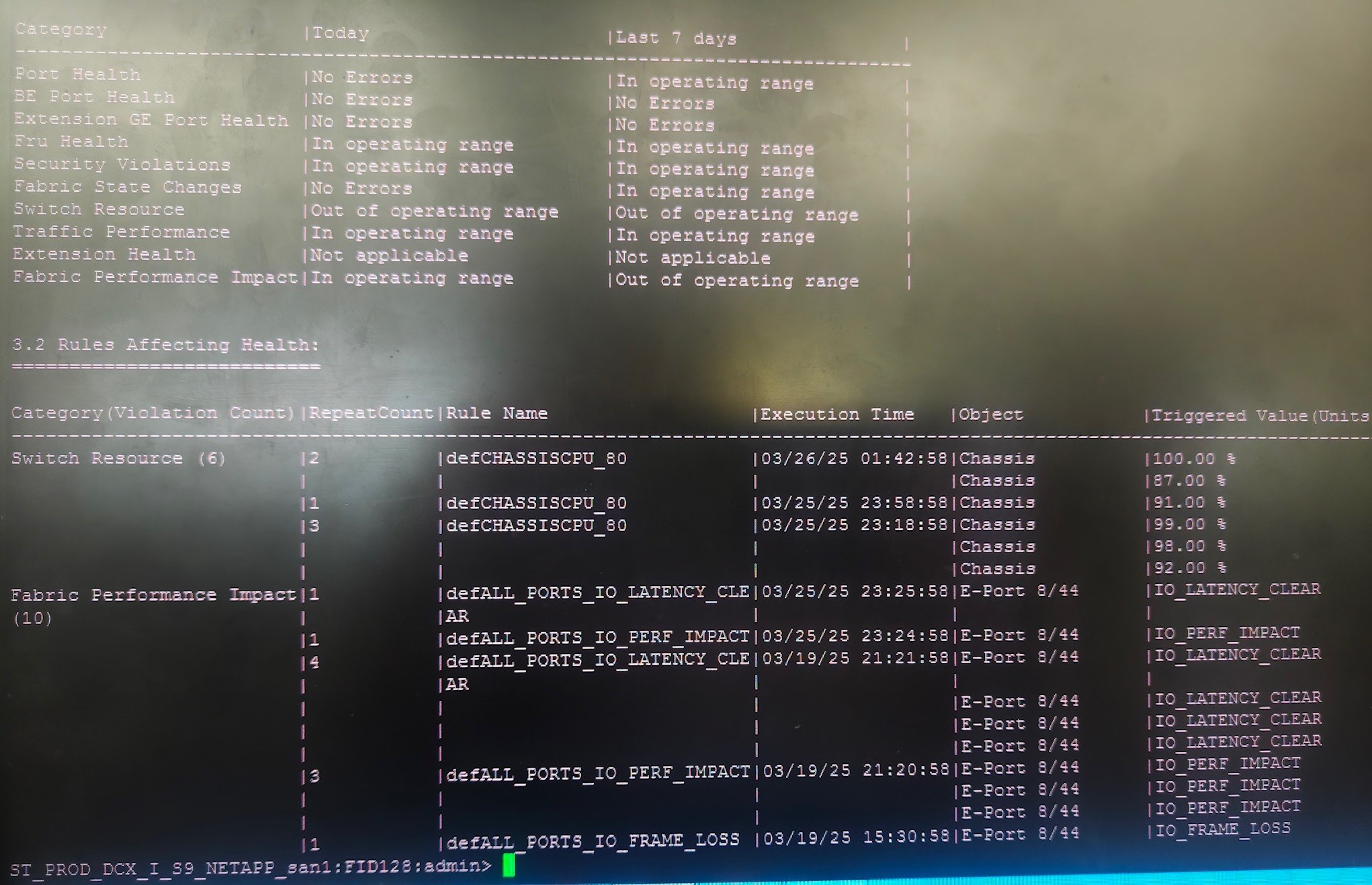
So what is MAPS: MAPS stands for monitoring Alerting polilcy suite. Whatever name it is , it is a monitoring utility based on policies. MAPS is a SAN health monitor supported on all switches running FOS 7.2.0 or later. MAPS is implicitly activated on FOS 7.4.0 or later. However doing so without a license provides reduced functionality. When you upgrade FOS to 7.4.0 or later, MAPS start monitor as soon as the switch is active. MAPS replaces the functionality of an earlier FOS feature called Fabric watch. the good part is MAPS information has timestamp so we know what happened on the switch and when! Here is an exmaple:
1 Dashboard Information:
=======================
DB start time: Mon Mar 28 17:51:00 2022
Active policy: IBM_SO_Standard_fos821_v15
Configured Notifications: RASLOG,SNMP,EMAIL,SW_CRITICAL,SW_MARGINAL,SFP_MARGINAL
Fenced Ports : None
Decommissioned Ports : None
Fenced circuits : N/A
Quarantined Ports : None
Top Zoned PIDs : 0x080200(48) 0x084200(48) 0x08b840(24) 0x08e040(24) 0x089840(24)
2 Switch Health Report:
=======================
Current Switch Policy Status: CRITICAL
Contributing Factors:
---------------------
*FAULTY_BLADE (MARGINAL).
*DOWN_CORE (CRITICAL).
3.1 Summary Report:
===================
Category |Today |Last 7 days |
--------------------------------------------------------------------------------
Port Health |No Errors |No Errors |
BE Port Health |Out of operating range |No Errors |
Extension GE Port Health |No Errors |No Errors |
Fru Health |Out of operating range |Out of operating range |
Security Violations |Out of operating range |Out of operating range |
Fabric State Changes |Out of operating range |No Errors |
Switch Resource |In operating range |In operating range |
Traffic Performance |In operating range |In operating range |
Extension Health |Not applicable |Not applicable |
Fabric Performance Impact|Out of operating range |Out of operating range |
3.2 Rules Affecting Health:
===========================
Category(Violation Count)|RepeatCount|Rule Name |Execution Time |Object |Triggered Value(Units)|
-----------------------------------------------------------------------------------------------------------------------------
BE Port Health(1) |1 |defALL_BE_PORTSLR_5M_10 |11/21/22 15:27:01|BE Port 10/69 |4.2G |
| | | |BE Port 10/68 |4.2G |
| | | |BE Port 10/66 |4.2G |
| | | |BE Port 10/65 |4.2G |
| | | |BE Port 10/63 |4.2G |
Fru Health(12) |10 |defALL_SLOTSBLADE_STATE_FAU|11/21/22 15:28:32|Blade 8 |FAULTY |
| |LTY | | | |
| | | |Blade 5 |FAULTY |
| | | |Blade 12 |FAULTY |
| | | |Blade 11 |FAULTY |
| | | |Blade 10 |FAULTY |
|1 |defALL_PORTSSFP_STATE_IN |11/16/22 15:18:39|U-Port 9/47 |IN |
|1 |defALL_PORTSSFP_STATE_OUT |11/16/22 15:18:32|U-Port 9/47 |OUT |
Security Violations(22) |1 |SWITCH_SEC_TELNET_log |11/21/22 16:10:45|Switch |6 Violations |
|1 |SWITCH_SEC_LV_log |11/21/22 16:10:45|Switch |6 Violations |
|2 |SWITCH_SEC_LV_log |11/18/22 22:09:03|Switch |17 Violations |
| | | |Switch |6 Violations |
|5 |SWITCH_SEC_TELNET_log |11/18/22 22:09:03|Switch |17 Violations |
| | | |Switch |6 Violations |
| | | |Switch |5 Violations |
| | | |Switch |33 Violations |
| | | |Switch |8 Violations |
|5 |SWITCH_SEC_LV_log |11/14/22 01:10:20|Switch |6 Violations |
| | | |Switch |14 Violations |
| | | |Switch |8 Violations |
| | | |Switch |6 Violations |
| | | |Switch |6 Violations |
|8 |SWITCH_SEC_TELNET_log |11/14/22 01:10:20|Switch |6 Violations |
| | | |Switch |14 Violations |
| | | |Switch |8 Violations |
| | | |Switch |6 Violations |
| | | |Switch |6 Violations |
Fabric State Changes(4) |2 |SWICTH_EportDown_Alert |11/21/22 15:28:34|Switch |16 Ports |
| | | |Switch |16 Ports |
|2 |SWITCH_EPORT_DOWN_alert |11/21/22 15:28:34|Switch |16 Ports |
| | | |Switch |16 Ports |
Fabric Performance Impact|2 |ALL_HOST_TX_log |11/21/22 12:15:15|F-Port 11/24 |75.45 % |
(347) | | | | | |
| | | |F-Port 11/24 |76.22 % |
|1 |ALL_OTHER_F_TX_alert |11/21/22 09:06:39|F-Port 4/18 |90.06 % |
|5 |ALL_OTHER_F_TX_log |11/21/22 09:14:21|F-Port 10/20 |75.21 % |
| | | |F-Port 4/18 |75.42 % |
| | | |F-Port 10/20 |75.32 % |
| | | |F-Port 4/18 |75.37 % |
| | | |F-Port 10/20 |89.64 % |
|1 |ALL_HOST_TX_log |11/21/22 00:47:21|F-Port 2/24 |75.26 % |
|7 |ALL_HOST_TX_log |11/21/22 00:38:09|F-Port 2/24 |76.09 % |
| | | |F-Port 2/24 |77.57 % |
| | | |F-Port 2/24 |75.53 % |
| | | |F-Port 2/24 |75.30 % |
| | | |F-Port 2/24 |75.55 % |
|1 |defALL_LOCAL_PIDSIT_FLOW_16|11/20/22 22:39:58|Pid 0x08e840 |24 IT-Flow(s) |
| | | |Pid 0x08a840 |24 IT-Flow(s) |
| | | |Pid 0x084300 |24 IT-Flow(s) |
| | | |Pid 0x085300 |24 IT-Flow(s) |
| | | |Pid 0x084200 |48 IT-Flow(s) |
|55 |ALL_HOST_TX_log |11/20/22 18:03:51|F-Port 10/24 |75.72 % |
      Port  1:
  =============
  Identifier:  3    SFP
  Connector:   7    LC
  Transceiver: 700c406000000000 4,8,16_Gbps M5,M6 sw Inter,Short_dist
  Encoding:    6    64B66B
  Baud Rate:   140  (units 100 megabaud)
  Length 9u:   0    (units km)
  Length 9u:   0    (units 100 meters)
  Length 50u (OM2):  4    (units 10 meters)
  Length 50u (OM3):  10   (units 10 meters)
  Length 62.5u:2    (units 10 meters)
  Length Cu:   0    (units 1 meter)
  Vendor Name: BROCADE
  Vendor OUI:  00:05:1e
  Vendor PN:   57-0000088-01
  Vendor Rev:  A
  Wavelength:  850  (units nm)
  Options:     003a Loss_of_Sig,Tx_Fault,Tx_Disable
  BR Max:      0
  BR Min:      0
  Serial No:   JAA111291XXXXXX
  Date Code:   110724
  DD Type:     0x68
  Enh Options: 0xfa
  Status/Ctrl: 0x0
  Pwr On Time: 7.45 years (65339 hours)
  E-Wrap Control: 0
  O-Wrap Control: 0
  Alarm flags[0,1] = 0x0, 0x0
  Warn Flags[0,1] = 0x0, 0x0
  Temperature: 42      Centigrade
  Current:     7.108   mAmps
  Voltage:     3313.9  mVolts
  RX Power:    -2.5    dBm (568.3uW)
  TX Power:    -2.3    dBm (594.6 uW)
            Dec  4 22:35:47 fscsi4     T FCP_ERR4            Adapter driver's cmd entry point rejected an ELS due to ENETDOWN
            Dec  4 22:35:27 fscsi4     T FCP_ERR4            Adapter driver's cmd entry point rejected an ELS due to ENETDOWN
            Dec  4 22:35:13 fscsi4     T FCP_ERR4            Adapter driver's cmd entry point rejected an ELS due to ENETDOWN
            Dec  4 02:08:28 fcs4       T FCA_ERR4            Too many FABRIC_OPS failures (FLOGI fail)
            Dec  4 02:08:10 fcs4       T FCA_ERR4            Too many FABRIC_OPS failures (FLOGI fail)
            Dec  4 02:07:47 fcs4       T FCA_ERR4            Too many FABRIC_OPS failures (FLOGI fail)
            Dec  4 02:07:32 fcs4       T FCA_ERR4            Too many FABRIC_OPS failures (FLOGI fail)
            Dec  4 02:06:39 fcs4       T FCA_ERR4            Too many FABRIC_OPS failures (FLOGI fail)
            Dec  4 02:06:14 fcs4       T FCA_ERR4            Too many FABRIC_OPS failures (FLOGI fail)

            FIBRE CHANNEL STATISTICS REPORT: fcs4

            Device Type: FC Adapter (adapter/pciex/df1000e31410140)
            Serial Number: Y050HY132011

            ZA: 11.2.211.9
            World Wide Node Name: 0x200000109BC72D96
            World Wide Port Name: 0x100000109BC72D96

            FC-4 TYPES:
              Supported: 0x0000010000000000000000000000000000000000000000000000000000000000
              Active:    0x0000010000000000000000000000000000000000000000000000000000000000

            FC-4 TYPES (ULP mappings):
              Supported ULPs:
                    Small Computer System Interface (SCSI) Fibre Channel Protocol (FCP)
              Active ULPs:
                    Small Computer System Interface (SCSI) Fibre Channel Protocol (FCP)
            Class of Service: 3
            Port Speed (supported): 16 GBIT
            Port Speed (running):   8 GBIT
            Port FC ID: 0xCD2B00
            Port Type: Fabric
            Attention Type:   Link Down
            Topology:  Point to Point or Fabric

            Seconds Since Last Reset: 21046778

                Transmit Statistics    Receive Statistics
                -------------------    ------------------
            Frames: 982703109           1203143688
            Words:  265014135808        346205522176

            LIP Count: 0
            NOS Count: 0
            Error Frames:  99
            Dumped Frames: 0
            Link Failure Count: 6408
            Loss of Sync Count: 600943871
            Loss of Signal: 0
            Primitive Seq Protocol Error Count: 0
            Invalid Tx Word Count: 1279236056
            Invalid CRC Count: 99

            FC SCSI Adapter Driver Information
              No DMA Resource Count: 0
              No Adapter Elements Count: 0
              No Command Resource Count: 0

            FC SCSI Traffic Statistics
              Input Requests:   92741830
              Output Requests:  189647540
              Control Requests: 179995
              Input Bytes:  1376015491235
              Output Bytes: 1051010081792

            Adapter Effective max transfer value:   0x200000

            FC SFP Information
              Vendor Name: FINISAR CORP.
              Vendor OUI:  00009065
              Vendor PN:   FTE8516N1LCN-EM
              Temperature: 44.852 C     [Range -128 C - +128 C]
              Voltage :    3.465 V      [Range 0 V - +6.55 V]
              TX Bias:     8.026 mA     [Range 0 mA - 131 mA]
              TX Power:   -3.9147 dBm   [Range -40 dBm - +8.2 dBm]
                           0.4060 mW    [Range 0 mW - 6.5535 mW]
              RX Power:   -25.3760 dBm   [Range -40 dBm - +8.2 dBm]
                           0.0029 mW    [Range 0 mW - 6.5535 mW ]  没有光, 可能是对端设备有问题,或者光纤链路有问题,也可能是对端设备把这个口给禁掉